TM SIM Registration 2026
With regulations from the Philippine government requiring SIM registration for all mobile users, registering your TM (Touch Mobile) SIM card is no longer optional. TM, a prepaid brand under Globe Telecom, has made the process straightforward for subscribers to comply with the law while keeping their services uninterrupted.
SIM registration TM ensures that your number is verified and protected, and it’s necessary to enjoy promos, calls, and internet services without any issues.
What is TM SIM Registration?
TM SIM registration is the process of linking your mobile number to a valid ID and your personal information. This is part of the SIM Card Registration Act (RA 11934), which aims to:
- Prevent fraud and scams
- Protect mobile users from unauthorized transactions
- Ensure secure use of mobile networks
Failure to register your SIM may result in deactivation or suspension of services.
Requirements for TM SIM Registration
To register your TM SIM, you need:
- Valid Identification
- Government-issued IDs like:
- Driver’s License
- Passport
- UMID
- PRC ID
- Postal ID
- For minors, a parent or guardian may assist.
- Government-issued IDs like:
- Active TM SIM
- Ensure your TM SIM is active and capable of sending/receiving messages.
- Personal Information
- Full name
- Birthdate
- Address
Step-by-Step Guide to Register TM SIM
Method 1: Through SMS
- Open the Messages app on your phone.
- Type: REG
ID type ID number - Example: REG DRIVER1234567890
- Send it to 2929 (Globe/TM registration number).
- Wait for confirmation SMS stating that your registration is successful.
Method 2: Via USSD
- Dial *143# on your TM SIM.
- Choose SIM Registration from the menu.
- Follow prompts to enter your personal information and ID details.
- Submit and wait for confirmation.
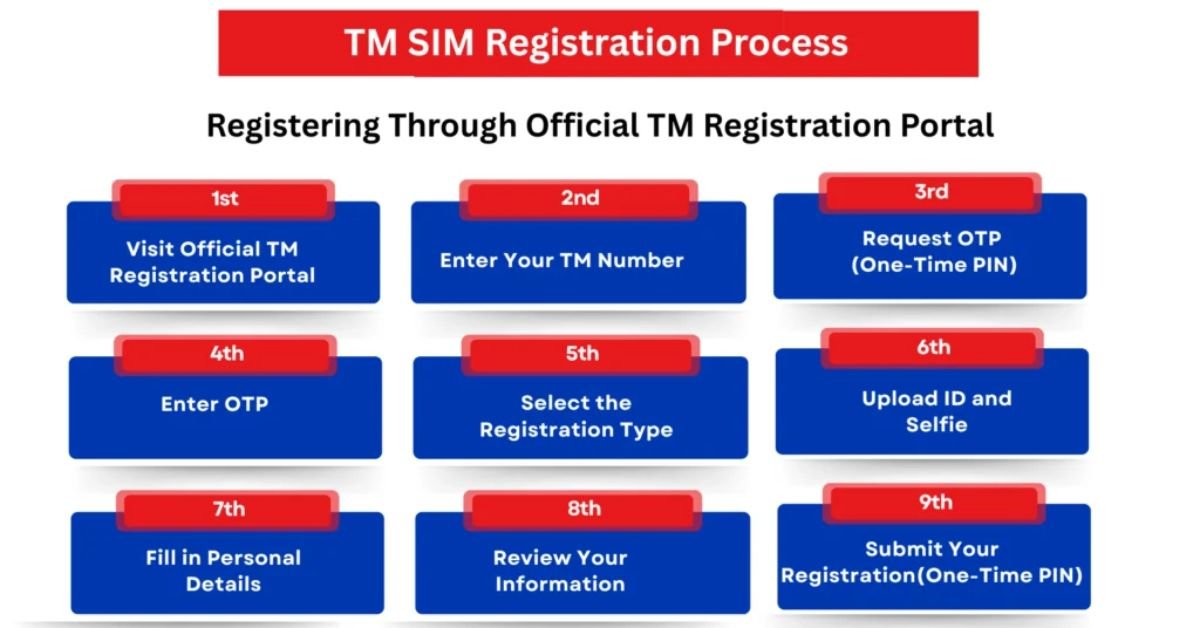
Method 3: Online Registration
- Use the Globe/TM official registration portal: https://www.globe.com.ph/sim-registration
- Enter your SIM number, ID type, and personal details.
- Confirm your submission and save the reference number.
How to Check If Your TM SIM is Registered
- Dial *143#, select Check Registration Status, and follow instructions.
- You will receive a message confirming your registration status.
It is essential to verify, especially if your SIM was purchased second-hand or if you recently ported a number.
Frequently Asked Questions (FAQs)
1. What happens if I don’t register my TM SIM?
Unregistered SIMs may be deactivated or restricted from making calls, texts, or using mobile data. Eventually, the number could be permanently blocked.
2. Can I register more than one SIM at a time?
Yes, but each TM SIM requires individual registration with a valid ID.
3. Can I register my TM SIM for someone else?
Only if you are a parent, guardian, or authorized representative for minors or incapacitated persons.
4. Is TM SIM registration free?
Yes, the registration process is completely free, whether through SMS, USSD, or online portal.
Tips for a Smooth TM SIM Registration
- Double-check your ID number and personal information before submission.
- Make sure your TM SIM has active load for SMS or USSD registration.
- Keep your registration confirmation SMS for reference.
- If you encounter issues, contact TM customer support at 211.
Conclusion
Registering your TM SIM is a simple but crucial step to ensure uninterrupted service and compliance with Philippine regulations. With multiple convenient options like SMS, USSD, or online portal, TM makes it easy for subscribers to stay connected safely.
Whether you are a new TM user or an existing subscriber, completing your SIM registration now avoids future service interruptions and gives you peace of mind.